
When you buy something through one of the links on our site, we may earn an affiliate commission.
Want to know how to build a directory website?
These types of web directories have been around for years. And with the ever expanding growth of businesses, this can quickly become a consistent income stream for you.
In this post, I'll show you how to start a directory website, the different types to choose from, and how to monetize it.
Let’s get started.
Contents
How to Build a Directory Website
To create a directory website with WordPress, here are the steps involved:
- Decide which type of online directory to start.
- Choose a web directory niche.
- Consider monetization options.
- Set up your site and decide which software to use.
- Promote your online directory.
Building your directory website is the straightforward part. The challenging bit is choosing a niche and defining your marketing strategy.
Considering these steps first will result in streamlined success. Let’s break each of these steps down, starting with the different types of online directory websites to choose from.
Different Web Directory Types to Choose From
There are tons of different types of online directory websites to choose from, so it's important to know what your options are.
Similar to your niche, it's a good idea to narrow down the type to differentiate your business and reach a more targetted audience. This can have lots of benefits such as higher listing fees and display ad rates.
Here are just a few types of web directories to choose from:
- Business directories: Yelp, Yellow Pages.
- Local directories: Nextdoor
- Niche or specialized directories: Vets, Doctors, Travel, etc.
- Job directories: Indeed, Monster, ProBlogger Jobs
- Educational directories: Coursera Directory, Open Education Database.
- Real estate directories: Zillow, Realtor.com, Trulia.
- Coupon and deal directories: RetailMeNot, Honey, Coupons.com.
As you can see, there are various avenues you can go down. Choosing one will depend on your interests or the type of audience you want to serve.
Choose a Web Directory Niche
Unless you have a huge marketing budget and years of hustle, you’ll probably want to avoid starting a generic directory website. This is where many people fail when learning how to build a directory website.
In most cases, niching down is a better strategy because there’s less competition and you can become the go-to authority a lot faster.
But how do you know which niche to go into? What is a successful niche? And what can you do to decrease your chances of failure?
The best way to find a good niche is by doing research, but you’ll want to follow these guidelines:
- It’s a topic you know about or are interested in.
- It's something evergreen, i.e. businesses that are unlikely to die out (health, relationships) and avoiding businesses only in demand at certain times of the year (festivals).
- There’s demand for it (home office furniture/equipment).
A great example of a niche business directory is Noomii, a business directory for coaches.
From professional coaches to health and wellness coaches or relationship coaches, they have built a very niche directory of thousands of professionals willing to pay to list their services. Here, a paid membership costs $397 per year.
With thorough brainstorming and a little patience, you’ll find a niche that covers the points above and will attract businesses in that market who will want to sign up to your site.
Another way to get ideas is to get involved in online forums and communities to find out which businesses need help with promotion strategies.
If you can find enough people within a niche that are looking for a platform to advertise and promote themselves, then you’re onto a winner.
Monetize Your Directory Website
The next step in how to build a directory website before you begin is to think about how you’re going to monetize it.
Even if in the beginning you launch it as a free platform, it’s important to consider what your options are. Then as your site grows in traffic, the more valuable it’ll become. Businesses will be more willing to pay a premium.
Here are just a few common ways you can monetize an online directory website:
1. Paid Listings
Probably the most obvious and common way to monetize is to charge a small fee for members to list their business.
When your industry-specific directory business is bespoke and specialized, it will yield higher listing fees.
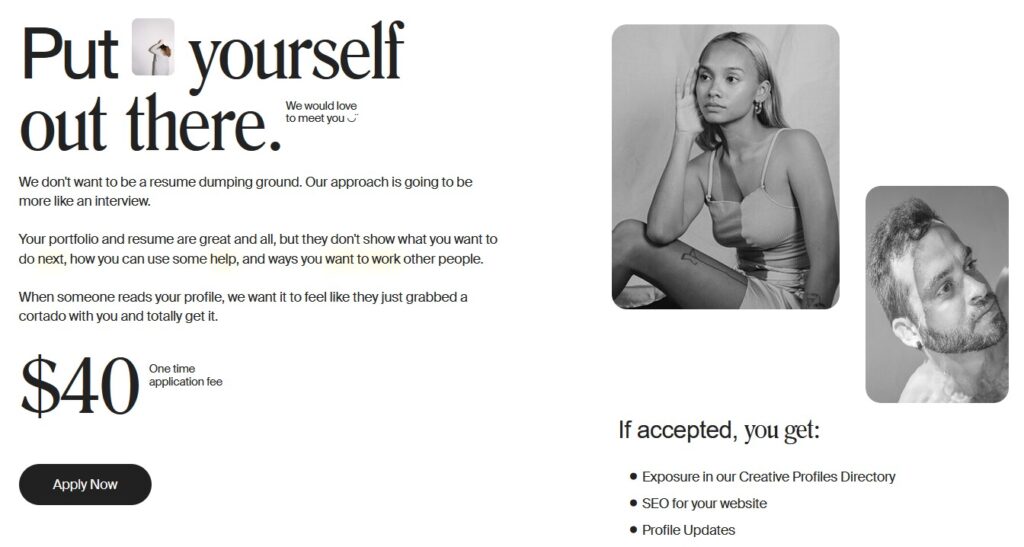
For example, I Love Creatives is a directory for creative professionals who can apply for a profile to promote and showcase their work.
The site received 100,000+ monthly visits in 2020 and charged a $40 fee to create a profile.
2. Featured Listing
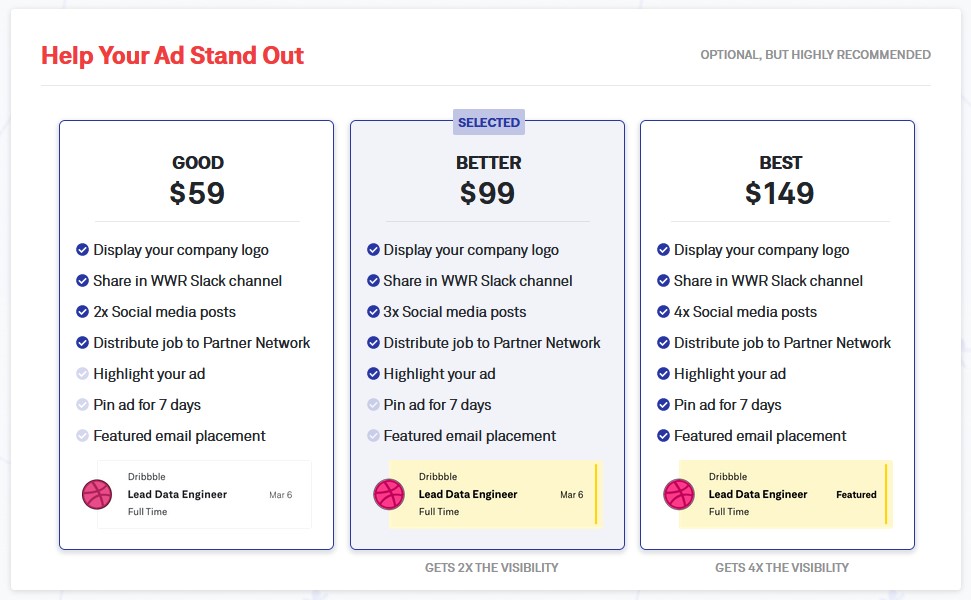
We Work Remotely is a job listings directory site. Businesses list positions available in their company to find remote workers. Instead of looking for customers, they’re looking for people to work with.
When posting a listing, which costs a whopping $299, they give you the option to “Help Your Ad Stand Out” by offering a featured listing upgrade.
You can choose from three options which offer different benefits from displaying your company logo to highlighting your ad to pinning your ad for 7 days. Upgrading to a featured listing costs anywhere from $59 to $149.
This is quite a common feature available in directory software where you're able to sell premium listings.
3. Subscriptions
Recurring monthly subscriptions are one of the most lucrative ways to monetize a website. When you start an online directory website and it takes off, businesses will happily pay a subscription if it helps them get more leads.
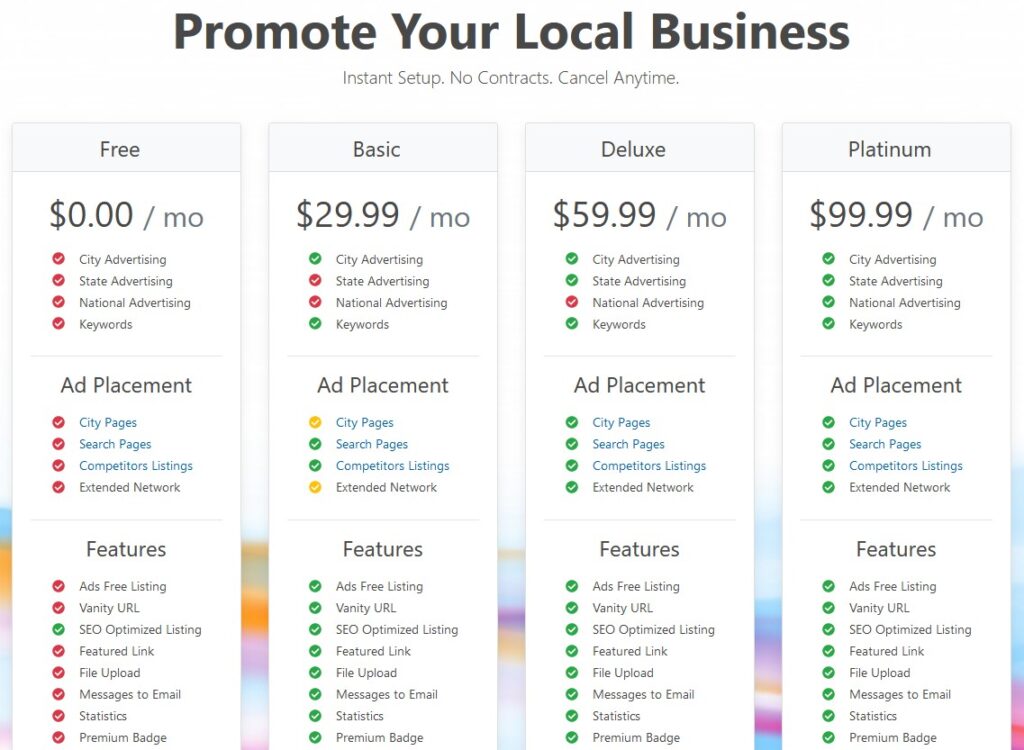
Show Me Local is a worldwide local business directory that offers a monthly subscription.
Businesses can sign up for a free account or choose from three paid subscriptions, each at different price points that offer unique benefits.
4. Google Adsense
Displaying ads on any website with a decent amount of traffic is a simple and smart way to diversify your income.
This does not differ from directory websites. In fact, it’s common.
You can sign up with an ad network and display relevant ads among the directory listing and featured ads.
It could even entice businesses to pay for a premium featured ad if they get pinned above the Google ads.
How to Build a Directory Website Using WordPress
Let's take a look at what's involved in building a directory website with WordPress.
1. Pick a Domain Name
Choosing a business name isn’t as difficult as it sounds, but finding an available domain name is a different kettle of fish.
If you need help to find a suitable domain, here are a few places you can look:
- Wordoid - A name generator that creates made-up, brandable words you can use as a domain name.
- Domain Name Soup - This one pairs cool and catchy words together and tells you if the domain name is available.
- Batname - Type a combination of words to find a memorable domain name for your business
Whatever name you come up with, make sure it’s short and memorable. Ideally, it should be something that reflects your niche and that your audience would understand.
Once you’ve found the perfect name, head over to a domain registrar, like Namecheap, to buy the domain. You can choose a domain name there for less than $10.
2. Get Web Hosting
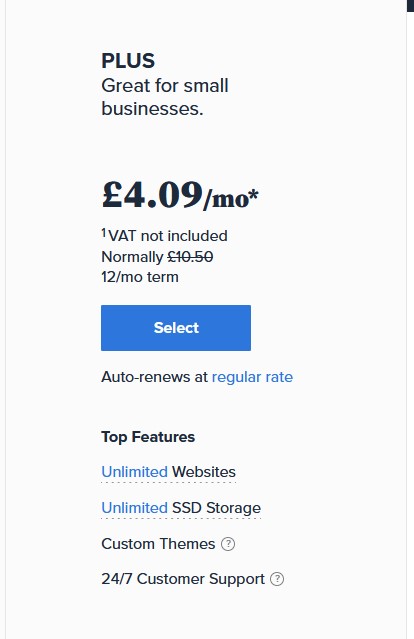
Web hosting is where your website files live, which people access when they visit your domain name. Purchasing hosting for WordPress is super easy and extremely affordable with a company like Bluehost.
Visit the Bluehost website and choose the Plus Plan, which is great for business websites just starting out:
Enter your domain name on the next page and click next:
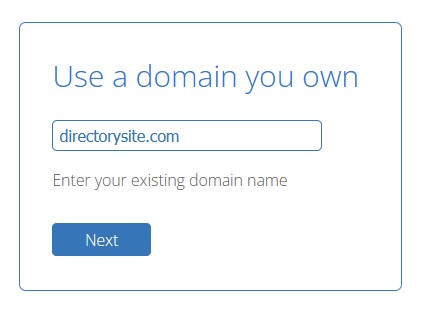
Once you have entered your details and placed your order, you’ll be able to log into your account and point your nameservers from Namecheap to your Bluehost server.
Your nameservers will look something like ns1.bluehost.com and ns2.bluehost.com:
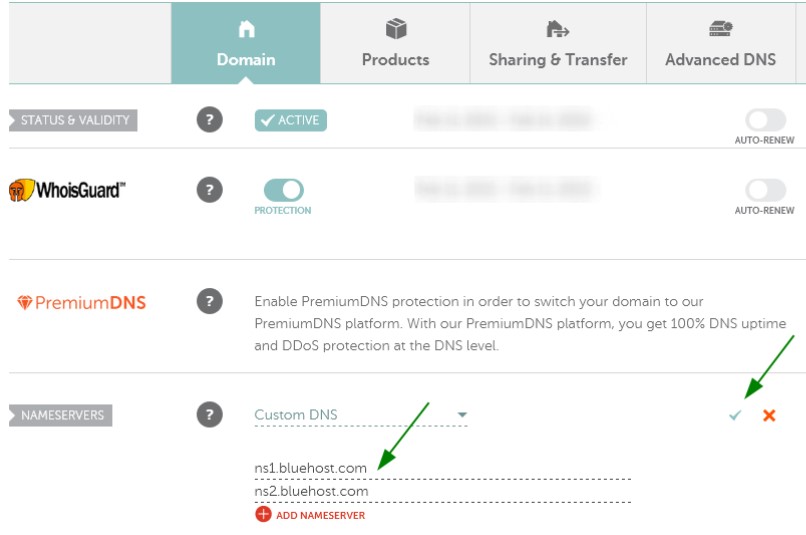
Then, from your Bluehost account, you can move onto the next step, which is to install a WordPress site.
3. Install WordPress
From your Bluehost Dashboard under My Sites, click on Create site:
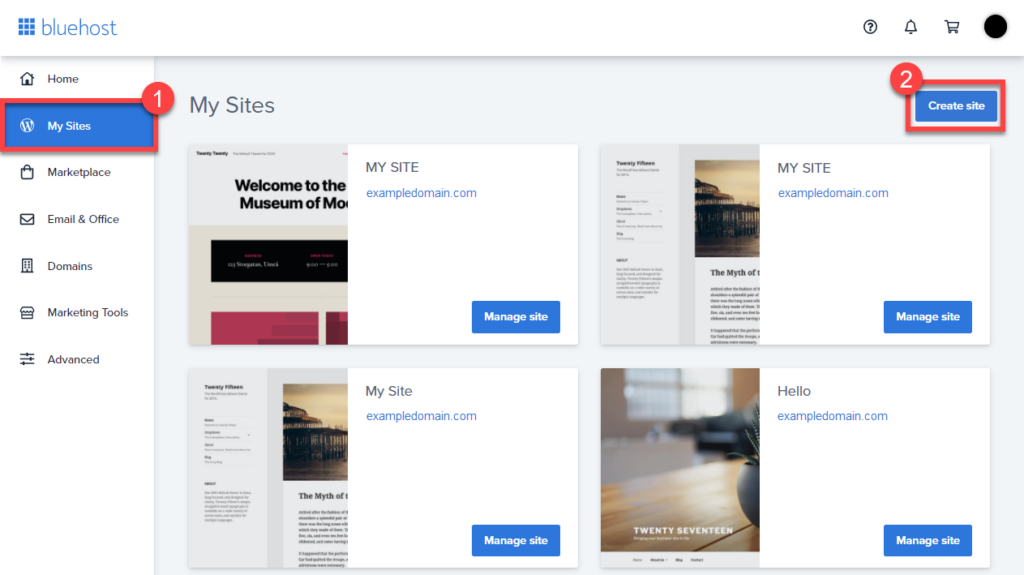
You’ll need to enter some details like your website name, tagline, email address, and create a strong password.
Once the installer is complete, you can see your site under the My Sites screen. Click Manage site and then Log in to WordPress on the next page:

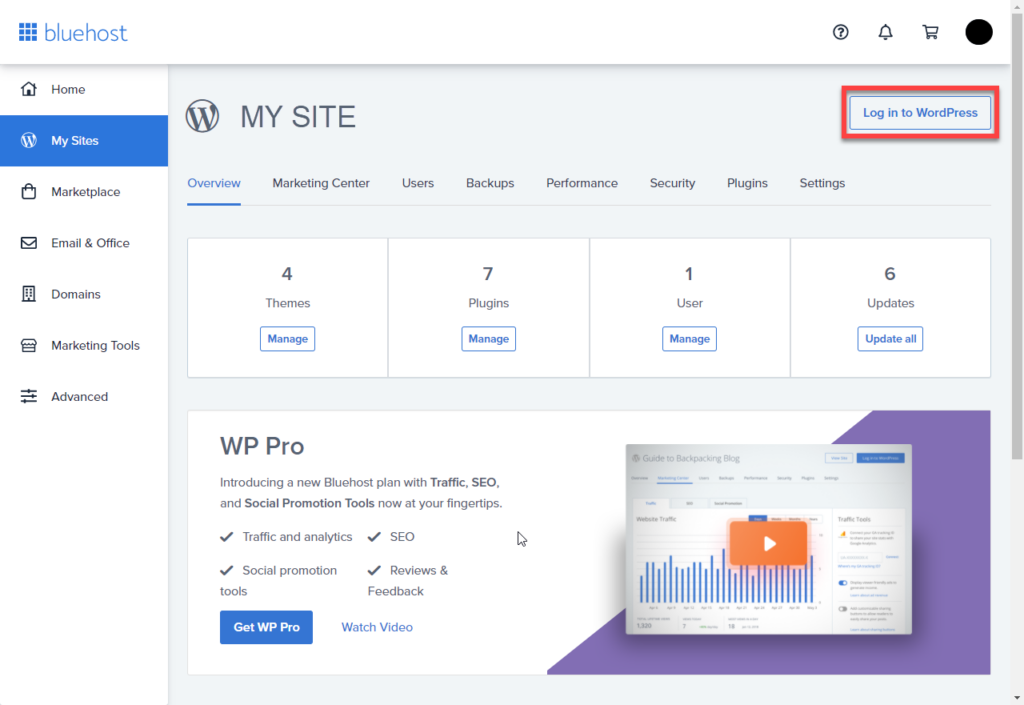
Congrats! You are one step closer to launching your directory website. You can log in to your WordPress Dashboard with the details you chose earlier and move on to the next step, which is choosing a web directory plugin.
3 WordPress Plugins to Power Your Directory Business
1. GeoDirectory
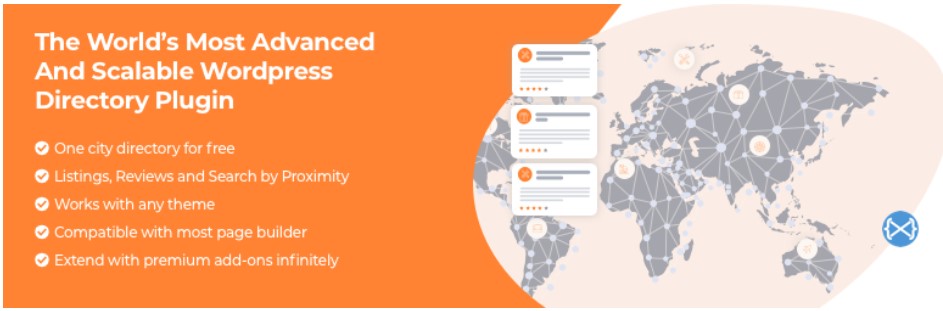
GeoDirectory helps you turn your WordPress website into a global directory business. It has a 4.6 star rating and 10,000+ active installs.
It’s lightweight and super fast, yet has plenty of advanced features. It is also compatible with Gutenberg and most page builders such as Elementor.
With GeoDirectory, it can manage millions of listings and a high volume of traffic which means it’s highly scalable.
It works by placing shortcodes on pages throughout the site. That means you can design the website to your exact specifications and place the shortcodes around the directory theme.
You can import demo content to populate your site with visual data. This gives you an idea of what your site will look like once users add their own business listings.
There are also addon plugins that expand its functionality. Free addons include:
- Event calendar plugin
- Real estate plugin
- Job listing website
- Classified ads
You can also add multilingual support and Google Analytics to the front end for users to get tracking statistics of their listings.
In the premium version, which starts at $99, you further extend the features of your directory site to include:
- Location manager
- Set prices for listings
- Add a professional event directory
- Rating categories and reviews (services, quality, price)
- Advanced search feature
- Buddypress integration
- Allow users to compare listings side by side
- And much more
Try out GeoDirectory with the free plugin. If you are happy with it, upgrade to the premium version. They also offer a lifetime plan, so for a one-time offer, you get unlimited support and updates.
2. Advanced Classifieds & Directory Pro
Advanced Classifieds & Directory Pro is a flexible directory website builder, capable of adding an unlimited number of custom fields. This allows you to accommodate any type of business with the details they want to share.
This plugin, created by PluginsWare, has a 4.8 star rating and 4000+ active installs.
You can sell listings under an infinite number of categories and subcategories, making it easy for directory website visitors to browse the business they’re looking for.
Admins have full control of listings including how they look and which details get displayed, the number of columns, and ability to change views based on category, location, or sort order.
Users can also add a Google map or images and videos with YouTube or Vimeo, making their listings stand out and engaging potential customers.
There’s an advanced search feature for users to find what they’re looking for by keyword, category, location, custom field, or price range.
Monetization options include featured listings, PayPal and Stripe payment gateways, WooCommerce integration, and free plans that don’t require WooCommerce.
Revenue Options include featured listings and WooCommerce integration. Free plans are built into the plugin, so WooCommerce isn’t required. For payment gateways, you can use PayPal or Stripe.
You can also set up email notifications so that admins get notified when new listings are added, orders are created, or payments are received. Users can also be notified when a new listing is posted and when a listing is about to expire.
The key features mentioned are included in the free plugin. You can upgrade to all features in their pro version, starting from $95.88 for an annual license.
3. Business Directory Plugin
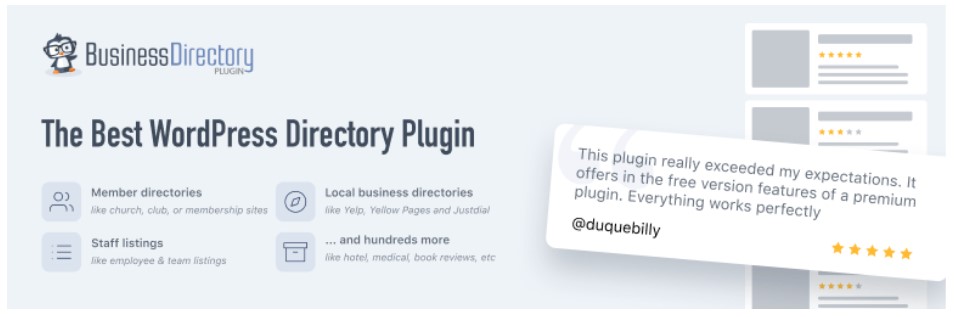
Business Directory Plugin is a simple business directory for WordPress that is perfect for the less tech savvy users.
It has a 4.7 star rating with 20,000+ active installs, making it one of the more popular listing directory plugins.
There’s no limit to the type of business directory you can create. From a small local directory to a global site like Yelp, anything is entirely possible.
There’s no limit to the type of directory website you can build. From a small local business directories to a global site like Yelp, anything is possible.
You can even create a book review site like Goodreads, a Yellow-Pages directory, real estate listings sites, or any niche directory site you can think of.
Business Directory Plugin has been used in dozens of niches including:
- Counselors
- Plumbers
- Electricians
- House cleaning
- Locksmiths
- Wedding vendors
- Veterinarians
- Consultants
- Photographers
You can use this plugin to generate revenue in multiple ways. For example, sell advertising space, sell listings to businesses, and offer paid recurring memberships.
There are plenty of free features which allow you to:
Customize form fields
Drag and drop image uploads
Accept paid or free listings
Set up recurring payments
Allow sticky listings for an upgraded fee
Create fee plans
Prevent users’ access to the WordPress dashboard
Full compatibility with SEO plugins
And so much more
Like other directory website builders in this list, there is a pro version you can upgrade to if you get on well with this plugin. Upgrading will add extra benefits to your site:
Allow users to upload files and attachments to listings, such as PDFs and images
Assign featured levels for users
ZIP code search
Have location-based filtering in results
Ratings and reviews on listings
Display Google maps
Offer discounts with coupon codes
Post listings that businesses can claim as their own when they sign up
With the premium version, you also get other payment gateways, including Stripe, PayPal, and PayFast. To design your site with Business Directory Plugin, there are 7 directory themes to choose from.
The premium plugin starts at $49.50 per annual license.
How to Promote Your Online Directory Website
You’ve learned the key steps to create a directory website. Now it’s time to think about how you will promote your website for businesses to find and sign up to your platform.
Social Media
Social media has very little friction when building an audience. That’s because most social networks are free and you can start engaging with people right away.
The best way to do this is to provide content that business owners would find valuable and help them promote themselves.
You can engage with entrepreneurs in Facebook groups, answer questions on Quora, start a Twitter thread, or create free business shout-outs on Instagram.
A good strategy would be to highlight the potential problems business owners face when finding new leads and promote their business in your directory as a possible solution.
Paid Advertising
Paid advertising is another way you can grow your audience starting today. The only difference is that there’s a cost involved.
That shouldn’t put you off, though. You can start with one platform such as Google ads and limit your budget to $5 per day.
If you don’t know how to use an ads platform, you could find someone on Fiverr to manage your ad campaigns, which can be quite affordable.
SEO
Search Engine Optimization is the act of optimizing your website so it can be found in Google search results. You do this by making sure you have enough web pages and content on your site when it’s ready for launch.
In the beginning, your directory website will only have a few pages of content, but they can be structured in a way that helps search engines understand what your site is about.
Once you gain new sign ups and business listings, this will impact your search rankings as a whole, but you’ll need to make sure these pages get optimized automatically with an SEO plugin like RankMath.
The listings users add to your site are called user-generated content. It’s important that you monitor this from time to time and make changes to get the best results.
You can also optimize your directory website for local SEO results. This will help your website show up for local searches, like “restaurants in New York”.
The great thing about directory websites is that you can automate a lot of on-page SEO tasks which will save you time. Meanwhile, your organic traffic will improve in the long run.
Blog Marketing
Blog marketing uses the power of SEO and provides your audience with useful content at the same time.
It works by finding keywords or phrases people are searching for and using them in your blog content. For example, a business owner might search for terms like, “where is the best place to advertise my restaurant”.
You can create an article with the answer to this question and list your business directory as the first option.
Adding 30-100 articles to your blog that help local business owners promote their business would likely improve your SEO rankings and result in higher organic traffic.
Time to Launch
Key takeaways are to find a good niche and define how you’ll generate revenue. You can build a directory website with WordPress and some plugins which I mentioned in the post.
Then, once you launch, it’s time to promote your website to business owners.
Starting a business directory is just one way to build passive income. You could pair this type of business with a marketplace website to add another income source.
Related Posts







Want to learn step-by-step how I built my Niche Site Empire up to a full-time income?
Yes! I Love to Learn
Learn How I Built My Niche Site Empire to a Full-time Income
- How to Pick the Right Keywords at the START, and avoid the losers
- How to Scale and Outsource 90% of the Work, Allowing Your Empire to GROW Without You
- How to Build a Site That Gets REAL TRAFFIC FROM GOOGLE (every. single. day.)
- Subscribe to the Niche Pursuits Newsletter delivered with value 3X per week
My top recommendations